


AI in CRM raises some logical questions. Where does customer data go? Who has access to it? Is the data used to train models? And what control do you, as an organization, actually have?
In this article, we answer the questions we often hear from companies considering HubSpot for CRM, data, and AI.
This article is intended as a practical guide, not as legal advice. Use it as a starting point for discussion and decision-making. If you work with data that is sensitive in terms of privacy, security, or compliance, always involve the person within your organization who is responsible for privacy, security, or compliance.
Brief summary
HubSpot Breeze uses AI models from third-party providers, such as OpenAI and Anthropic, but integrates them within HubSpot’s own security, permissions, and data layers.
Users can only access data via AI that they already have access to. Super Admins can determine which AI features and data sources are available. By default, HubSpot may use customer data to improve its own AI models, but you can disable this without losing AI functionality.
According to HubSpot, customer data is not used to train third-party models. However, external AI service providers may be involved in processing a specific AI task.
The bottom line: AI in HubSpot can be safe and valuable, but only if you carefully configure permissions, settings, sensitive data, and governance.
The Essence of AI in HubSpot
HubSpot hasn’t built its “own ChatGPT.” HubSpot’s AI features—known as Breeze —utilize, among other things, LLMs from OpenAI, and Anthropic. HubSpot wraps these with its own security, permissions structure, data layer, and governance.
Examples ofmodels used by include:
- OpenAI: GPT-4.1, GPT-4.1 mini/nano, GPT-5 Mini, and GPT Image-1*
- Anthropic: Claude Sonnet 4 for embedded functions and Claude Opus 4.5 for agents*
*Of course, this can change quickly given how rapidly new LLM models are being released one after another.
The AI is built into HubSpot, but the underlying intelligence comes in part from specialized AI providers.
In plain language: HubSpot determines the context, permissions, and data flows; external models provide part of the AI intelligence.
What happens to your customer data?
When someone uses HubSpot AI, relevant data from HubSpot can be used to perform that specific task or answer that specific question. This includes CRM data, conversations, files, customer information, or content— —depending on which AI settings are enabled.
It’s important to note that AI in HubSpot isn’t allowed to freely search the entire portal. The AI operates within the parameters of the permissions, settings, and data sources that your organization has configured.
Or, to put it simply: AI follows your configuration—provided you’ve set it up correctly.
Does AI suddenly give every employee access to all data?
No. Breeze adheres to the existing permissions structure.
If you work with restricted records, teams, roles, permissions, or field-level permissions in HubSpot, those restrictions remain in place. A user can only retrieve information via AI that they already have access to.
In other words, a sales representative without access to certain companies, deals, or contacts cannot retrieve that information via Breeze either.
In practical terms, this means that AI is not a backdoor to data that is normally restricted.
Note: AI does not fix a poor permissions structure. If too many users have overly broad access, then AI will have that access as well.
This is therefore a major advantage for companies that work with “Chinese walls” or restricted data organized by team, region, or business unit.
Does my data remain within the EU?
In principle, data remains within the region of your HubSpot account. If you have an EU-hosted account, HubSpot processes the relevant data within European regions to the extent that this applies within the described infrastructure and sub-processors.
However, it’s important to verify this specifically against your own HubSpot account, contract, and data processing agreement. This is because HubSpot works with multiple subprocessors, including infrastructure providers and AI service providers.
Please note: “processing within European regions” does not automatically equate to the legal conclusion that there is no international data transfer or additional transfer risk. Have this assessed based on your own contracts, DPA, data classification, and risk profile.
The commercial interpretation:
Your data does not simply “go out onto the internet,” but is processed within the HubSpot architecture and its associated subprocessor structure.
Who processes my data when I use HubSpot AI?
HubSpot publishes alist of sub-processors at . This list includes parties that may be involved in infrastructure and AI processing, such as AWS, Google, OpenAI, and Anthropic.
For AI, parties such as OpenAI and Anthropic are listed as AI service providers. AWS and Google also support parts of the infrastructure or regional data processing.
This is important for organizations with privacy or security concerns. After all, you don’t just want to know that AI is being used, but also:
- which third parties are involved;
- for what purpose they are being used;
- in which region the processing takes place;
- what rights you have if new subprocessors are added.
HubSpot offers the option tosubscribe to updates regarding subprocessors at. You will be notified in advance of any changes so that you can respond internally.
Will I be notified if HubSpot adds new AI subprocessors?
Yes, customers cansubscribe to updates at from HubSpot’s subprocessor page. If HubSpot adds new subprocessors or makes significant changes to existing subprocessors, you can receive advance notice.
This is relevant for organizations with a formal privacy or security process. You can then conduct an internal review to determine whether the change is acceptable.
In plain language:
You don’t have to keep checking the list manually; you can be notified of any changes.
Is sensitive data given extra protection?
Yes, HubSpot offers separate features for“ ” “Sensitive Data,” and “Highly Sensitive Data.” These allow you to handle sensitive information differently than regular CRM data.
This includes data subject to stricter privacy or compliance requirements. When using Sensitive Data,additional restrictions apply for AI usage and model training. By default, accounts with Sensitive Data areexcluded from AI model training.
This is an important consideration for organizations with sensitive customer data. It means you need to think not only about “Is AI on or off?”, but especially about:
- what data is stored in which fields;
- which fields are marked as sensitive;
- which users have access to those fields;
- which AI functions are or are not allowed to be applied to that data.
Does HubSpot use my data to train its own AI models?
Yes, it can. The setting“ AI Model Training” is enabled by default. However, you can disable this under Settings → AI → Access. Important: If you disable this, you won’t lose any AI functionality. You can continue to use Breeze, but your data won’t be used for HubSpot’s own model training.
The simple explanation:
You can use HubSpot AI without making your customer data available for training HubSpot’s own AI models.
Note: Disabling AI Model Training does not mean that AI features will no longer process any data at all. It means that HubSpot will not use your customer data to train its own AI models. Relevant data may still be processed when performing an AI task, depending on the feature used and your settings.
For many organizations, this is a logical first governance measure: enable AI functionality in a controlled manner, but disable model training until an internal policy has been established for it.
Do OpenAI, Anthropic, or other AI providers use my data to train their models?
HubSpot states that customer data is not used to train third-party models, such as those from OpenAI or Anthropic. In HubSpot’s AI Trust information and model cards, this is described as“No Customer Data Used For Third-Party Model Training.”
HubSpot also refers to zero data retention whenever possible. This means that data required to execute an AI request is not retained by the model provider to improve its own models.
Please note: “ not training” is different from “ not processing.” Depending on the AI function, AI service providers may be temporarily involved in processing to execute a specific request.
Do you work with NDA-sensitive, legal, medical, or other highly sensitive data? If so, have this assessed to determine whether it aligns with your contracts, data classification, and risk profile.
Therefore, it’s best to avoid using the absolute statement: “OpenAI never trains on your data.” A better approach is: “HubSpot states that its AI service providers are not permitted to use customer data to train their own models.”
Which AI settings can a Super Admin manage?
HubSpot provides Super Admins withvarious controls to manage AI usage. These allow you to determine which AI features are available and which data sources AI is permitted to use.
Key settings include:
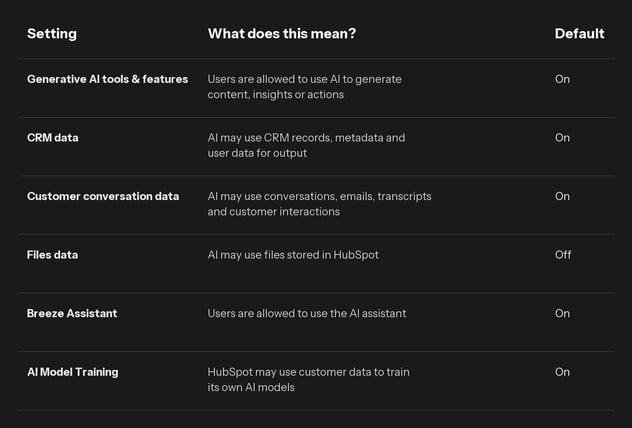
Files data is particularly important. This setting is turned off by default. This makes sense, since files often contain sensitive or less structured information, such as quotes, contracts, internal documents, or customer documentation.
Note: willonly enable“ Files data” after it has been determined which files are stored in HubSpot, who has access to them, and whether they contain confidential customer information, contracts, personal data, or NDA-sensitive information.
Are changes to AI settings logged?
Yes. Changes to AI settings are logged in the audit log.
This is important for governance. You want to be able to see afterward who modified AI access, when that happened, and which settings were changed.
For organizations with compliance requirements, this is no minor detail. It makes AI management auditable.
Practical example:
If a Super Admin enables access to CRM data for AI, you want to be able to see when that happened and who did it. This is especially important when working with customer data, personal information, or sensitive business information.
Do I need HubSpot Enterprise to use AI securely?
Not necessarily. You can manage AI settings even without Enterprise. But for organizations that place a high value on data protection, auditability, and compliance, Enterprise clearly offers more control.
Enterprise is particularly relevant if you need:
- field-level permissions;
- centralized audit logs;
- Sensitive Data and Highly Sensitive Data;
- additional encryption at the application layer;
- stricter access control;
- BAA capabilities for HIPAA contexts;
- Improved AI governance across teams and data sources.
In summary:
Using AI safely doesn’t start with Enterprise, but Enterprise makes governance much more mature.
For smaller organizations, a solid permissions structure, thoughtful AI settings, and disabling AI Model Training may be sufficient. For larger organizations, international companies, or companies handling sensitive data, Enterprise is often the logical choice.
What are Breeze Agents, and why do they require additional governance?
Breeze Agents are AI agents that can perform tasks within HubSpot. Examples include support for sales, customer service, marketing, content, customer inquiries, or data processing.
This is more powerful than just an AI assistant that generates text. An agent can be more closely integrated with processes and may be able to support or automate actions.
That’s why this requires clear agreements:
- Which agents are allowed to be used?
- Who is authorized to create or modify agents?
- Which data sources are agents allowed to use?
- Which output must be checked first?
- Which actions should never be performed fully automatically?
- Who is responsible for errors or undesirable output?
In plain language:
The more active the AI becomes, the more important governance becomes.
An AI assistant that suggests text is different from an agent that systematically supports customer interactions or prepares commercial follow-ups.
What should you agree on internally?
My advice is not to just “turn on” AI without thinking, but to briefly organize some decision-making around its use. It doesn’t have to be a lengthy legal document. A practical internal agreement is often a big step forward.
Answer at least these questions:
- Which AI features will we enable? Which ones will we not?
- Which data sources is AI allowed to use?
- Should we enable or disable AI Model Training?
- Who is allowed to change AI settings?
- Which user groups will be granted access?
- How do we handle sensitive data?
- Which output must always be reviewed by a human?
- Who monitors changes to subprocessors?
- When do we involve internal privacy, security, or compliance teams?
- How do we explain this to employees?
Ultimately, the responsibility for decisions and implementation naturally lies with the organization using HubSpot.
This prevents the use of AI from developing organically without clear guidelines.
What is the most important message for the board and management?
HubSpot AI isn’t just a standalone chatbot alongside your CRM. It’s AI that operates based on your CRM data, permissions, settings, and processes.
AI enhances a well-configured HubSpot setup but increases the risks associated with a poorly configured one.
That makes it powerful, but also sensitive to governance issues.
The key takeaway is:
HubSpot has built in AI in a relatively controlled way, but as an organization, you must make informed decisions about access, data sources, model training, sensitive data, and oversight.
AI in HubSpot is therefore not a simple “on/off” decision. It’s a matter of maturity:
- Is our data clean enough?
- Are our permissions properly configured?
- Do we know which data is sensitive?
- Do we have policies in place regarding AI usage?
- Do we have sufficient audit and oversight?
- Does our license align with our governance requirements?
Often, data is clean enough to start cautiously, but not always sufficient for AI to base decisions on its own. And as long as we still occasionally encounter ten Super Admins in HubSpot portals, access control is usually a better first step than worrying about other privacy and security aspects just yet.
Practical advice
For most organizations, this is a sensible starting point:
- Check your permissions structure First, see who has access to which records, properties, teams, and objects.
- Limit the number of Super Admins Too many Super Admins often means too little control over settings and governance.
- Deliberately enable or disable AI Model Training Disable it unless there is explicit consent to use data for this purpose.
- Leave “Files” data disabled by default Only enable this once it’s clear which files the AI is allowed to use.
- Check Sensitive Data Ensure that sensitive fields are properly configured and not scattered haphazardly throughout the CRM.
- Determine who is authorized to use Breeze Assistant and Breeze Agents Distinguish between experimental use, routine use, and process-critical deployment.
- Define who is authorized to manage AI settings Make this part of your management process, not a series of isolated individual decisions.
- Subscribe to updates from HubSpot’s subprocessors That way,you’ll know when there are changes to the parties involved.
- Agree on which AI outputs must be reviewed by humans This is especially important for customer communications, commercial follow-ups, legal texts, or sensitive decisions.
- Review this periodically AI functionality changes rapidly. For example, schedule a brief quarterly review of settings, sources, and policies.
This way, you can reap the benefits of AI without losing control over data and governance.
In conclusion
This article is based on publicly available HubSpot documentation and is intended as a practical summary. It is not legal advice, a DPIA, a security assessment, or an evaluation of your specific HubSpot portal, contracts, or data flows.
AI functionality is changing rapidly. Models, subprocessors, settings, default values, and terms and conditions are subject to change. Therefore, always check the current HubSpot AI Trust page, HubSpot AI settings, HubSpot Terms, and Subprocessors Page before relying on this information.
If you’re dealing with privacy-, security-, or compliance-sensitive situations, be sure to have the person within your organization responsible for privacy, security, or compliance review this information with you.
Want to learn more?
Is your organization in the midst of transitioning to an AI-first approach? Are the topics mentioned above risks that are preventing your organization from making a greater impact with AI in your commercial processes? I’d love to talk with you!

Download the ultimate CRM implementation guide
.png?width=318&height=267&name=Brown%20and%20Cream%20Minimalist%20Book%20Mockup%20Facebook%20Post%20(2).png)
Many CRM projects deliver less value than expected.
In this whitepaper, you'll discover how to implement CRM not just as a tool, but as the foundation for commercial growth. From strategy and processes to user adoption and business impact.
Share this

HubSpot Claude Connector: what can you do with it?
HubSpot Product Updates: May 2026